



Instead of repeatedly emailing disconnected drawings and specifications, connect your house plan to a NatHERS assessment through one revision-controlled package: site details, coordinated drawings, construction specifications and a written brief. Have an accredited NatHERS assessor model that package, return proposed changes to your designer, then align the final assessment with the drawings you submit and build from.
- For your house plan NatHERS assessment, submit coordinated drawings, site orientation and construction specifications together.
- Australianhousedesigns offers ready-made house plans and custom drafting; arrange NatHERS assessment as a separate, confirmed scope.
- Check thermal performance early, then update the assessment whenever relevant drawings or specifications change.
- A NatHERS rating does not replace building approval or confirm every construction requirement.
Why this matters
A floor plan shows room arrangements, but an energy assessment needs more: location, orientation, windows, shading and the materials separating indoor and outdoor conditions. A layout alone cannot establish the finished home's thermal performance.
Australianhousedesigns house plans are best for buyers seeking ready-made layouts or custom drafting, rather than a substitute for a site-specific energy assessment. Start with Australianhousedesigns, then confirm who will prepare the assessment and coordinate any drawing changes.
For a 2026 project, establish the applicable energy-efficiency requirements with your building surveyor or certifier before commissioning final documentation. Requirements depend on the jurisdiction, building classification and approval pathway; a national headline is not your project's compliance brief.
NatHERS thermal ratings run from 0 to 10 stars and describe modelled heating and cooling needs. Whole of Home assessment considers a broader energy picture, including relevant equipment and energy systems. Neither is a prediction of your household's exact electricity bill.
Before you start
- People and access: appoint an accredited NatHERS assessor and identify the designer, builder and building surveyor or certifier responsible for answering questions. Confirm how drawings and assessment documents will be exchanged.
- Source material: gather the site plan, floor plans, elevations, sections, window information and proposed construction specifications. Include the site address, north direction and relevant shading information; ask the assessor to identify missing inputs before modelling starts.
- The gotcha: a generic plan is not a site-specific rating. Rotating or mirroring a layout, changing glazing or adding shading can alter the result, so assess the version positioned on your actual block.
Ask the assessor for an input checklist and a clear scope. Confirm whether the engagement covers preliminary advice, thermal assessment, Whole of Home assessment, revisions and the final documentation required for your approval pathway. Do not assume these are bundled together.
Your assessment brief
Establish the assessment pathway
- Send the site address and proposed building type to your assessor and building surveyor or certifier. Identify whether the proposal is a new dwelling, an alteration or another type of project.
- Ask which energy-efficiency requirements and documentation apply to your 2026 application. Record the answer in your project brief rather than relying on a plan description.
- Confirm whether you need thermal assessment, Whole of Home assessment or another accepted compliance method. Ask who checks requirements outside the assessor's agreed scope.
- Choose the first assessment milestone: early design feedback or final documentation. Early feedback supports design decisions; final documentation must reflect the resolved proposal.
Expected result: everyone agrees on what is being assessed, which requirements apply and what documents the assessor will deliver.
Use these two workflows to decide when to engage the assessor. They serve different stages, not competing assessment standards.
| Workflow | Best for | Advantage | Limitation |
|---|---|---|---|
| Early design assessment | Buyers still resolving orientation, windows and room layout | Identifies performance issues while the design can change | Results depend on preliminary assumptions and need updating |
| Revised-plan assessment | Buyers changing an already assessed design or specification | Checks whether the revised proposal remains consistent with the assessment | Requires clear change records and can trigger further drawing revisions |
Choose early assessment when meaningful design choices remain open. Use revised-plan assessment to maintain consistency after those choices change, not to avoid the initial assessment.
Your drawing and specification package
Assemble the source documents
- Collect the latest site plan, floor plans, elevations and sections. Check that dimensions, ceiling heights, openings and external shading agree across the set.
- Identify each external wall, roof, ceiling and floor construction. Describe insulation, finishes and relevant air spaces clearly enough for the assessor to understand the proposed assembly.
- Coordinate the window schedule with the drawings. Include window sizes, opening types and the performance information requested by the assessor; a description such as double glazing is not a complete specification.
- Add site information that affects exposure and shading. Show north direction, relevant neighbouring obstructions, eaves, verandahs and other fixed shading elements.
- Where Whole of Home assessment applies, provide the proposed heating, cooling, hot-water and other relevant system details requested by the assessor. Identify undecided selections explicitly.
Expected result: the assessor receives a coordinated description of the building, not separate documents that contradict each other.
A preview drawing can help you shortlist a layout, but confirm its suitability for assessment before sending it as the final input. Missing sections, construction details or window information leave decisions unresolved; they do not establish that a plan fails.
Create the document register
Keep 1 current drawing set and 1 change log as your shared reference. Archive superseded documents separately so they cannot be mistaken for the current proposal.
Use a simple register with the headings below. These are suggested document labels, not mandatory software fields.
| Register heading | What to record | Why it matters |
|---|---|---|
| Document | Drawing title or specification name | Identifies the source material |
| Revision | The issue identifier printed on the document | Distinguishes current and superseded information |
| Issue date | The document's actual issue date | Supports an accurate change history |
| Status | Preliminary, for assessment or final | Prevents draft material being treated as resolved |
| Change summary | What changed since the previous issue | Directs the assessor to affected inputs |
Avoid labelling a folder only with 2026 and final. A year identifies the project period, not which window schedule or insulation specification was assessed.
The modelling and revision loop
Review the assessment inputs
- Send the coordinated package with the document register. Ask the assessor to confirm the drawing revisions used in the model.
- Resolve missing inputs before treating the result as final. Have the designer or relevant supplier confirm construction and product information rather than leaving unsupported assumptions in place.
- Request feedback that identifies the issue and proposed change. Ask whether the concern relates to orientation, glazing, shading, insulation, construction or another modelled input.
- Return proposed changes to your designer for coordination. Check their effect on room use, elevations, site constraints and other project requirements before accepting them.
Expected result: proposed performance improvements are translated into buildable drawing and specification changes, with responsibility assigned for each decision.
The useful connection is a controlled feedback loop: Source documents, Energy model, Design changes, Final check. Do not leave assessor recommendations in an email while the drawings continue to show the original proposal.
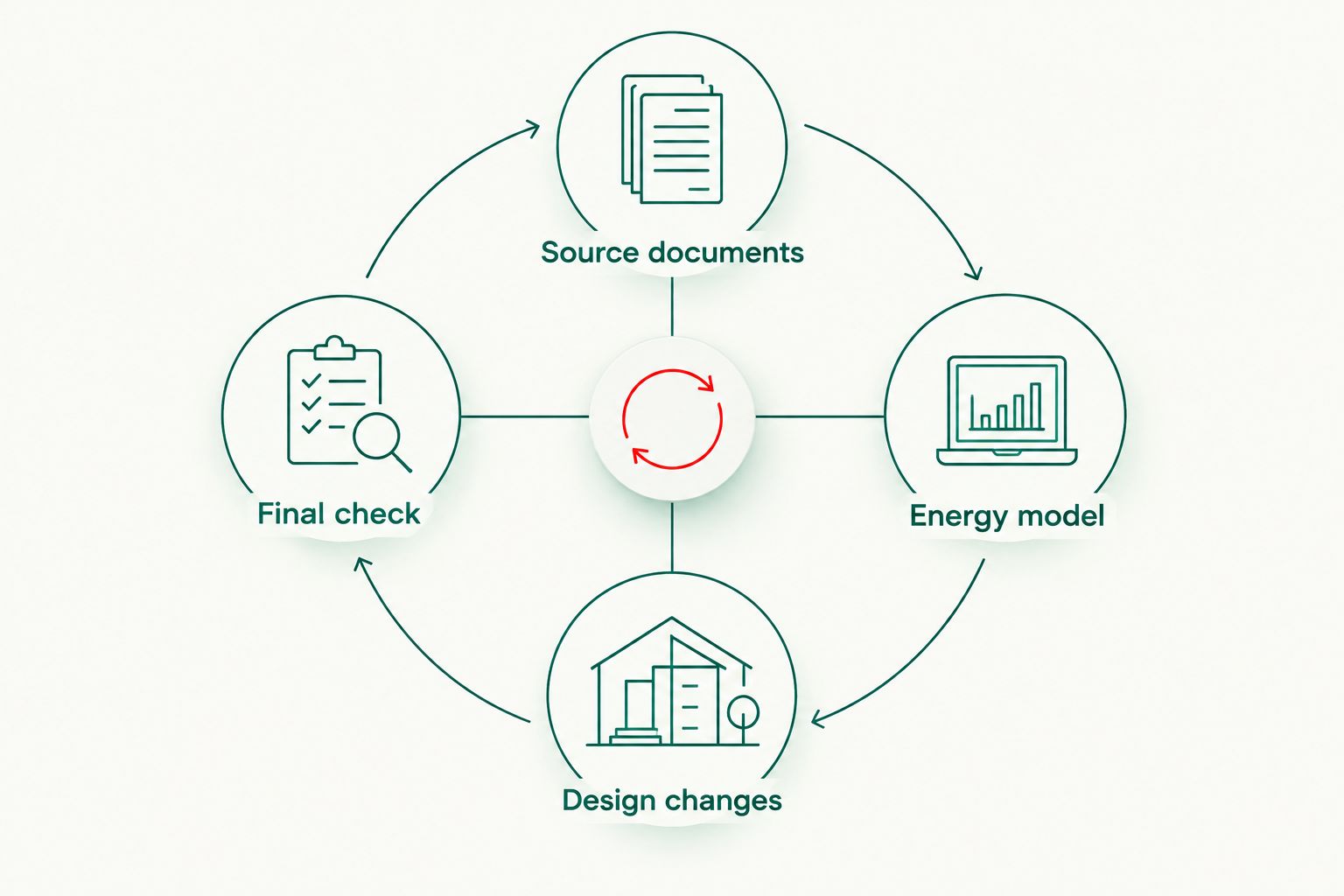
Assess changes as a coordinated package. Enlarging a window while altering its shading and performance specification creates a different proposal from changing the window size alone. Ask the assessor to evaluate the actual combination you intend to build.
Close the final assessment
- Issue the resolved drawing set and specifications to the assessor. Include a change summary, even when the changes appear minor.
- Obtain the final assessment documentation and any required stamped drawings. Check the site details, assessed dwelling, drawing references and specified construction against the coordinated package.
- Send matching documents to your building surveyor or certifier. Follow the house-plan handover to a building certifier workflow to keep the assessment connected to the wider submission.
- Give the builder the same assessed specifications and explain how proposed substitutions must be reviewed. Do not distribute an older drawing set alongside the current certificate.
Expected result: your approval package and construction information describe the same assessed proposal.
For a 2026 submission, check the accepted documentation format with the receiving building surveyor or certifier. An assessment document is part of the submission; it does not itself grant building approval.
When your house plan changes after assessment
Use an update workflow whenever a revision affects modelled information. Relevant changes include rotating or mirroring the house, altering windows, changing insulation, modifying shading or substituting specified systems covered by the assessment.
- Record the proposed change before it reaches construction. Identify the affected drawing, specification or equipment selection.
- Send the assessor the revised documents and a concise change summary. Include supplier performance information where a substitution is involved.
- Ask whether the model and issued documentation need updating. Let the assessor determine the assessment effect rather than assuming the change is equivalent.
- Obtain revised documentation where required and confirm any approval implications with your building surveyor or certifier. Withdraw superseded copies from the active project folder.
Expected result: the current assessment stays connected to the current design, rather than becoming a record of a house you no longer intend to build.
For Australianhousedesigns custom drafting, make assessment feedback part of your design instructions. Agree on who receives the feedback and who authorises revisions; do not assume coordination duties without confirming them.
Troubleshooting
The assessor cannot complete the model
Fix the missing inputs before requesting a final result. Ask for a specific information list, then allocate each item to the designer, supplier or builder. Insulation descriptions, construction assemblies and window performance details need clear answers.
The result changes after the plan is mirrored
Assess the actual orientation. Mirroring or rotating a plan changes how rooms and windows face the sun, so a result for another orientation is not interchangeable. Check the site plan and model orientation together.
The proposed glazing does not match the assessment
Get the substitution checked before ordering. Frame type, glass configuration and performance values matter; a broad label such as energy-efficient glazing does not demonstrate equivalence. Send the proposed supplier information to the assessor.
The certificate and drawings show different revisions
Stop the handover and reconcile the documents. Establish which drawings were assessed, identify subsequent changes and request updated assessment documentation where needed. Renaming a file does not update the model behind it.
The thermal rating passes but the package remains incomplete
Check the agreed assessment and approval scope. A thermal star rating does not resolve every energy-efficiency or building requirement. Ask the assessor and building surveyor or certifier which outstanding items require action.
Customise your workflow
For a ready-made plan, start by checking the proposed layout against your block and identifying what needs changing. Australianhousedesigns offers ready-made house plans and custom drafting, but the service description alone does not establish the energy-assessment scope for your project.
For a custom design, set an assessment checkpoint before fixing performance-sensitive selections. You retain room to change orientation, glazing and shading instead of treating the assessment as paperwork after every decision is settled.
Keep your 2026 project brief focused on outcomes and responsibilities: who supplies inputs, who revises drawings, who checks substitutions and who distributes final documents. Expand the workflow to include approval and construction handovers, not just receipt of a certificate.
FAQ
How do I connect my house plan to a NatHERS assessment?
Send an accredited NatHERS assessor a coordinated package of site information, drawings and construction specifications. Resolve assessment feedback through your designer, then align the final assessment with the documents used for approval and construction.
Can a ready-made house plan already have a usable NatHERS rating?
An existing rating is not automatically applicable to your site and proposed specification. Have the assessor check the location, orientation, construction and other inputs before relying on it.
Can I use only a floor plan for a NatHERS assessment?
A floor plan alone does not describe all the inputs needed for a completed assessment. The assessor also needs relevant site, elevation, section, construction, glazing and shading information.
Does adding solar improve the thermal star rating?
Solar electricity generation does not improve the NatHERS thermal star rating. It is relevant to Whole of Home assessment, which considers a broader energy picture than the building's heating and cooling needs.
Do I need another assessment if I change the windows?
Ask your assessor to review window changes before you commit to them. Changed sizes, frames, glass or performance specifications can affect the model and require updated documentation.
Does Australianhousedesigns provide the energy assessment with every plan?
Do not assume an energy assessment is included with a house plan. Confirm the purchased scope and separately establish who will provide the site-specific assessment and coordinate revisions.
Does a NatHERS certificate mean my house is approved?
No, a NatHERS certificate does not grant building approval. Your building surveyor or certifier checks the wider submission against the requirements applicable to your project.
One last thing
Check the documents behind the rating, not just the star result. A satisfactory result attached to superseded drawings does not confirm the revised proposal. Before handover, match the assessment's drawing references to the set your builder will use.